
Case study · Built for carriers in Canada and the US
Trucking & freight management software, from rate confirmation to paid invoice
A complete system for 1–50 truck carriers: dispatch, loads, a driver app, compliance, CAD and USD invoicing and built-in accounting.
I designed and built it end to end, for a market with its own rules: Canadian and US carrier numbers, cross-border loads, two currencies, provincial sales taxes and inspection standards. It shows the kind of system I can build for a business that has outgrown spreadsheets and group chats.
- MarketCarriers with 1 to 50 trucks in Canada and the US
- ScopeOffice web app, driver phone app and accounting
- RoleDesigned and built end to end
The problem
How a small carrier's office usually runs.
Rate confirmations are retyped into spreadsheets, the week is planned on a whiteboard or in a group chat, drivers are chased for PODs days after delivery, and detention time is lost because nobody wrote down when the truck arrived. Medicals and annual inspections lapse without notice, and invoices go out a week late, then get entered again in the accounting software.
The goal was one system that runs the carrier from the rate confirmation to the paid invoice, with a phone app drivers would actually use.
The hard parts
What made this more than a load list.
Rate confirmations into loads
An uploaded PDF or photo fills in customer, stops, appointments, rate and accessorials, matched to saved customers, locations and charge codes, with anything doubtful flagged before saving.
Two currencies, two countries
USD invoices carry the exchange rate and the gain or loss is booked automatically. Sales taxes cover GST, HST and QST, and zero-rated cross-border loads.
Compliance that blocks mistakes
Expiring licences, medicals, CVOR, NSC, IRP and insurance show on the dispatch board, and a major inspection defect takes the truck out of service until it is repaired.
A driver app with no app store
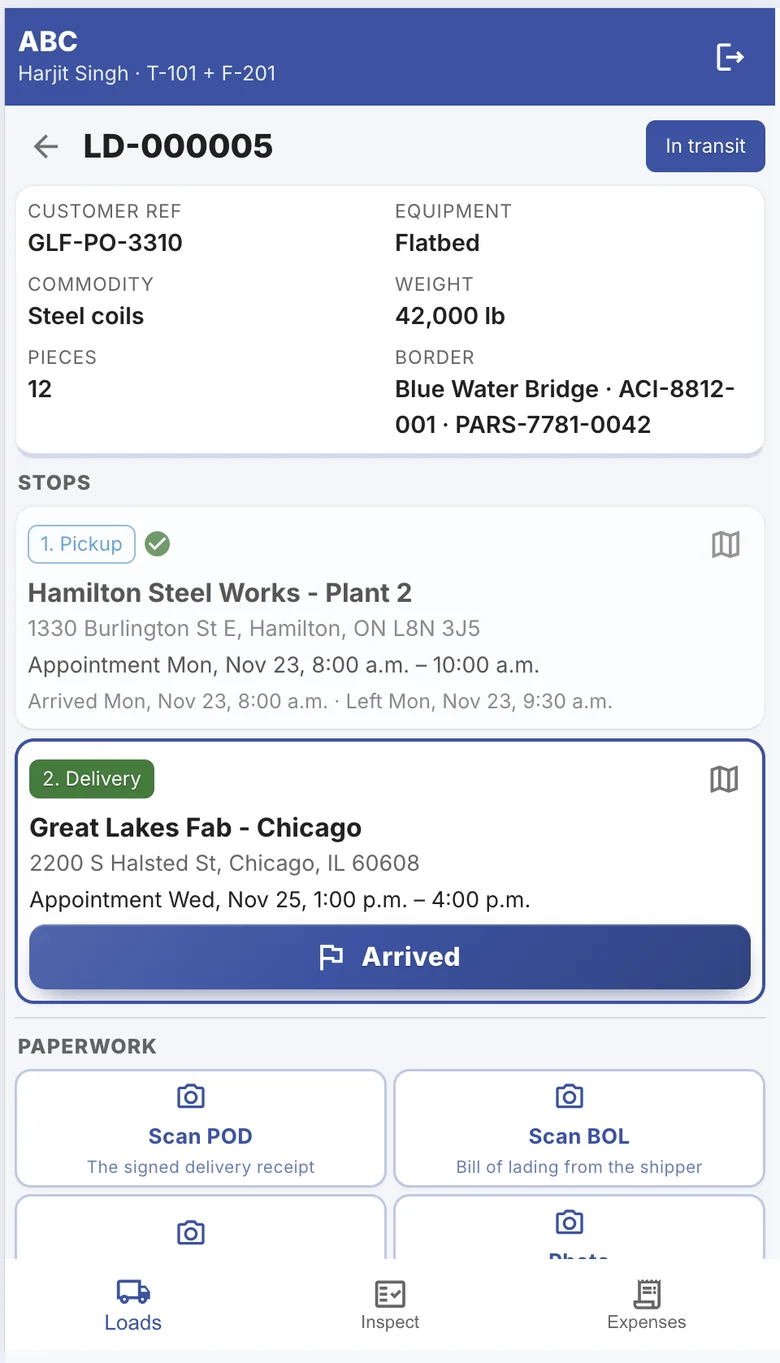
Runs in the phone browser and sits on the home screen: stops in order, Arrived and Left, POD and BOL scans as one PDF, receipts and inspections. Drivers never see rates.
Detention worked out, not argued
From arrival and departure at each stop, over the free time, at the customer's hourly rate, added as a charge in one click.
Accounting underneath everything
Invoices, payments, expenses and bank reconciliation post to real books, with an AI assistant that drafts entries for a person to approve.
Dispatch board
Your whole operation on one board
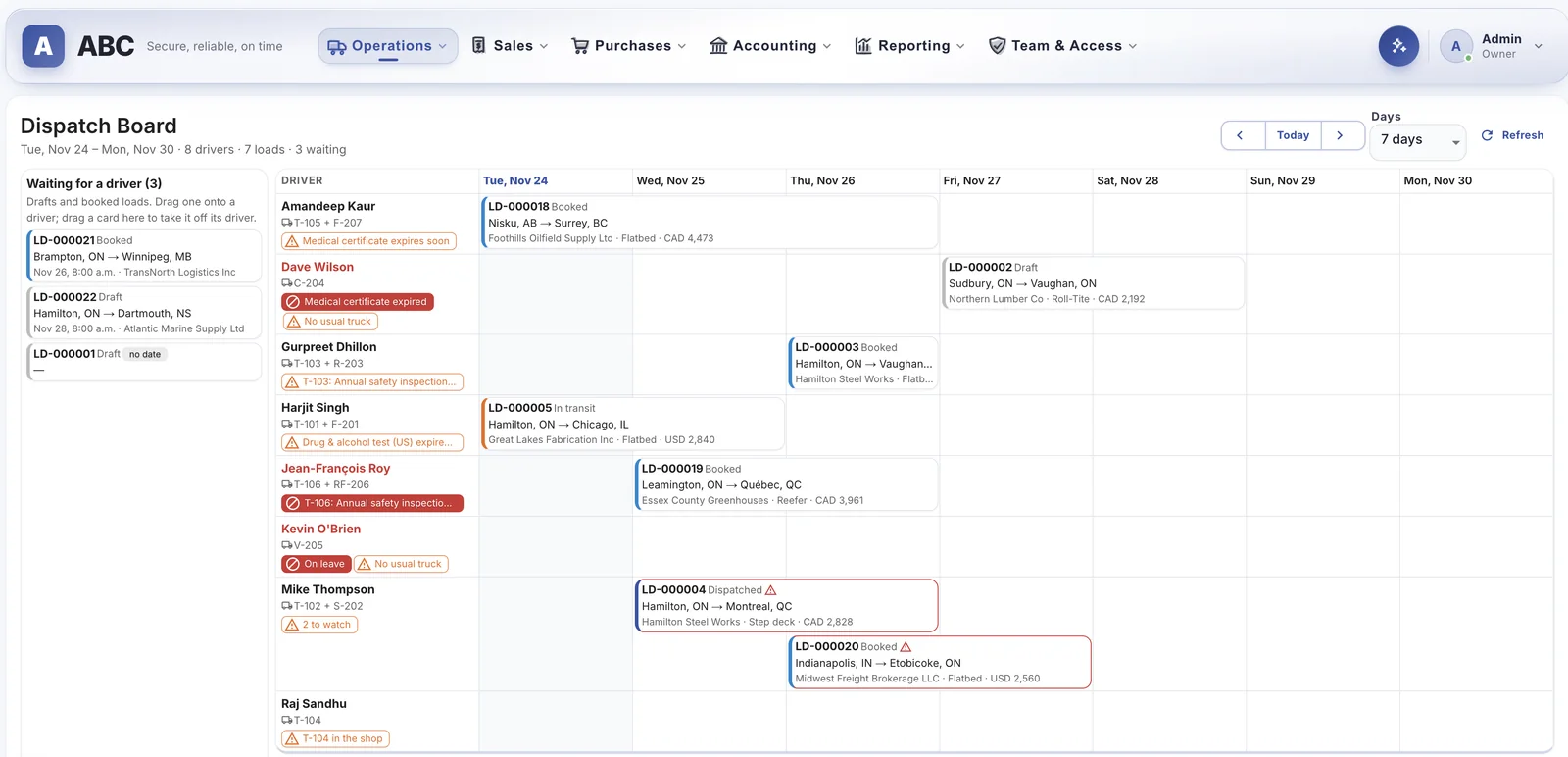
See every driver, every load and every problem for the week at a glance. Drag a load onto a driver and it's assigned, truck and trailer included.
- Drivers down the side, days across. Loads appear as cards, with the customer, lane, equipment and rate.
- Problems flagged on the driver. Expired documents, trucks out of service, drivers on leave and trucks in the shop, in red and amber.
- Overlaps stand out. Two loads that overlap for the same driver are outlined before they turn into a missed appointment.
- A waiting list. Drafts and booked loads with no driver sit on the left, ready to drag onto the board.
- Any week, any length. Move day by day or week by week, and choose how many days to see.
Every load, from booked to paid
Clear stages
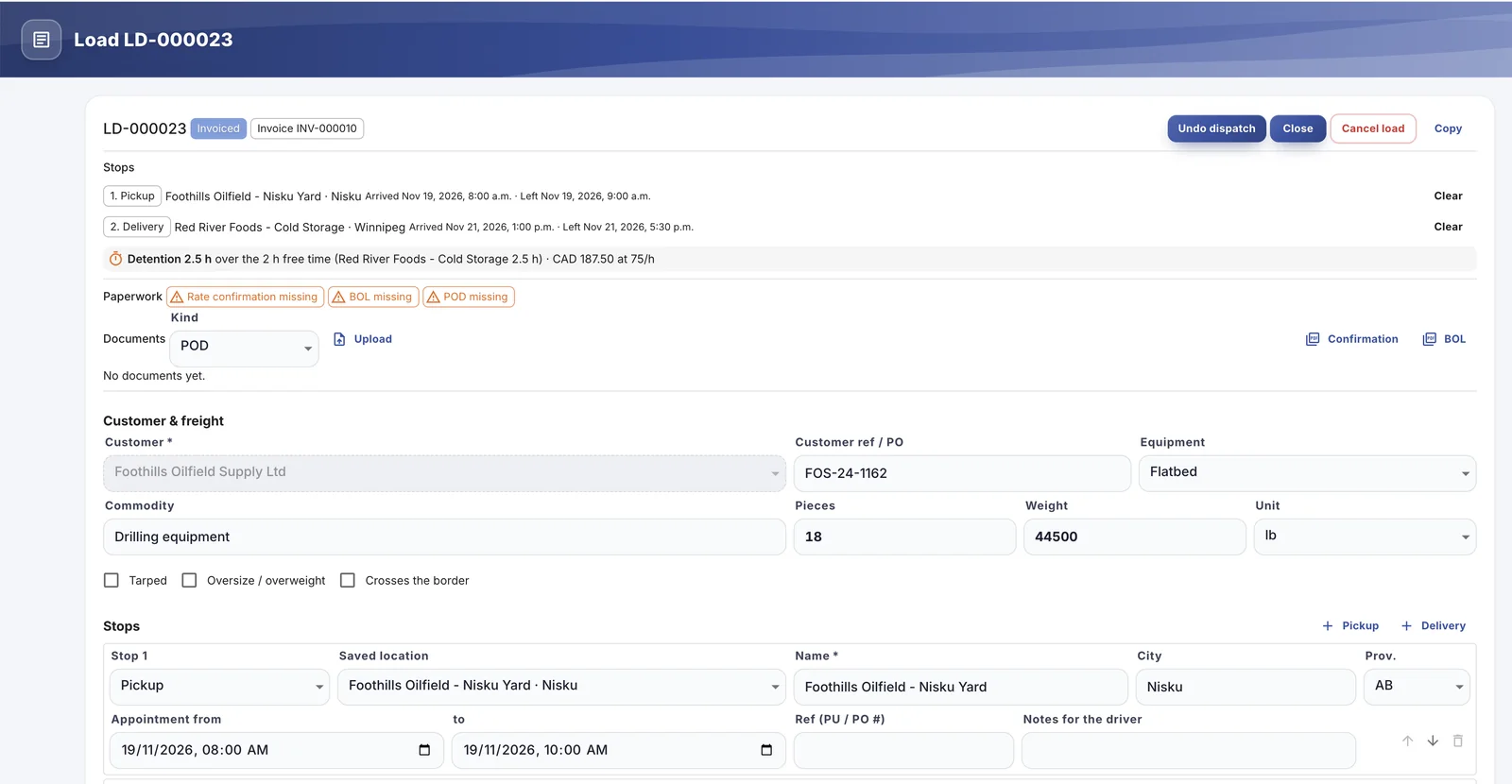
Booked, Dispatched, At pickup, In transit, Delivered, POD received, Invoiced and Paid, with a count on each tab.
From rate con to load in seconds
Upload the rate confirmation, PDF or photo. Customer, reference, stops, appointments, rate and accessorials are filled in and matched to your customers, locations and charge codes.
It tells you what to check
An unknown customer or a total that doesn't add up is pointed out before you save, and the rate con is attached to the load.
Detention, worked out for you
From the arrival and departure times at each stop, over the free time, at your hourly rate, added as a charge in one click.
Paperwork checklist
Rate con, BOL and POD on every load, with anything missing flagged.
Documents in one click
Load confirmation, carrier rate confirmation and BOL as PDFs.
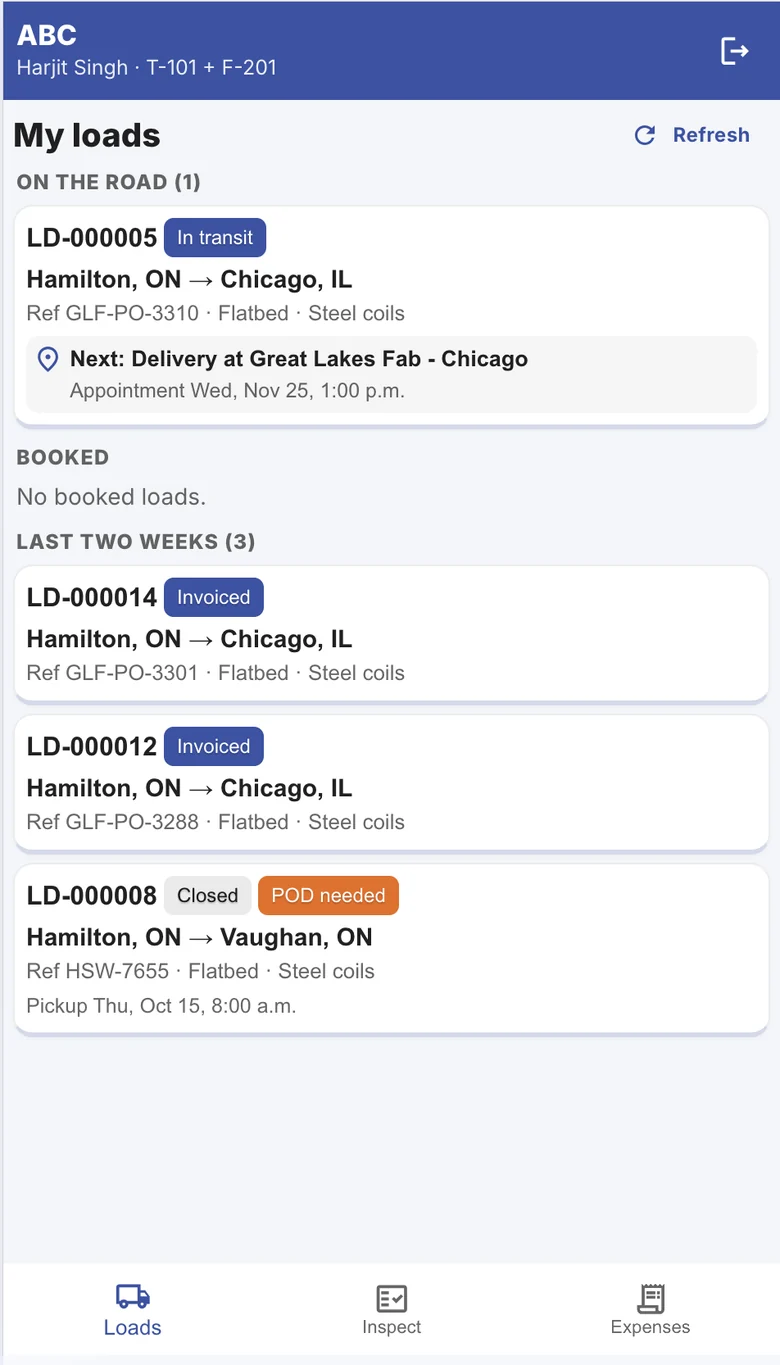
A driver app drivers will actually use
Built for a phone in a cab, not a desk.
Nothing to install from a store
Drivers sign in from their phone's browser and add it to the home screen. It works like an app, without the App Store or Google Play.
Stops in order
Appointments, reference numbers and a map link for every stop, with one big button for Arrived and then Left.
POD and BOL scans
One photo per page, sent to the office as a single PDF and attached to the load.
Expenses with a receipt photo
Tolls, fuel and other costs from the road. Fuel captures the province or state and the litres, ready for IFTA.
Pre-trip and post-trip inspections
A checklist on the phone. A major defect takes the truck out of service until it's repaired.
Drivers never see rates
Only their loads, stops, appointments and paperwork. No rates, no totals.
Made for Canada, ready for the US
Built for how carriers work on both sides of the border
The numbers, taxes and units your customers, brokers and the border expect, set up from day one.
- Your carrier numbers on your documents. CVOR, NSC, US DOT, MC, IFTA and UCR.
- Cross-border loads. ACI eManifest, PARS and PAPS numbers on the load, where the driver can see them.
- Kilometres or miles, pounds or kilograms. Whichever your fleet and customers use.
- CAD and USD. Bank accounts in both currencies, and invoices in either.
- Sales taxes set up for you. GST, HST and QST, and zero-rated cross-border loads.
- The right access for each person. Ready-made roles for owner, dispatcher, accounting, safety and driver, each seeing only what they need.
Need a system like this for your business?
I build custom operations, ERP and accounting software, and the apps that go with it, for businesses anywhere. Tell me how your work runs today and I'll show you what it could look like.
- WhatsApp+92 345 458 0083
- Book a call30-min video call (Calendly)
- Email[email protected]
- LinkedInlinkedin.com/in/zia-urrehman
- LocationLahore, Pakistan · working with clients worldwide