
Law firm management software for Pakistan
The court side and the money side of your firm, in one system
In the office and on the phone outside the court room. Hearings, diary, fees, cheques, documents and staff, all connected.
The clerk records the hearing in the corridor, the next date goes into the diary, the team is told and the client hears the same day. Meanwhile fees, tax deducted and every cheque are accounted for without a separate register.
- Same-day client updatesnext dates reach the client automatically
- Nothing slipsunrecorded hearings, lapsing stays and PDCs flagged
- Strict confidentialityeach role sees only its part, screenshots blocked on the apps
What it is, in plain words
Law firm management software built around how courts in Pakistan actually run.
Law Firm Management is one system for a Pakistani law firm's court work and its accounts. Hearings are recorded on the phone outside the court room, the next date goes straight into the court diary, and the client is told the same day. Fees with tax deducted at source, client ledgers, cheques, post-dated cheques, expenses and payroll sit in the same place, so the partners see the whole firm on one screen instead of in five registers.
Litigation chambers
Daily cause lists in the High Court, civil, banking and labour courts, with clerks and juniors in several court rooms at once.
Firms with bank and corporate clients
Retainers, tax deducted at source, a case report per bank and a clear view of the amounts at stake for each client.
Partners who want control
Approvals, profit and loss, who sees what and a record of every change, without chasing anyone for an update.
Clients who want answers
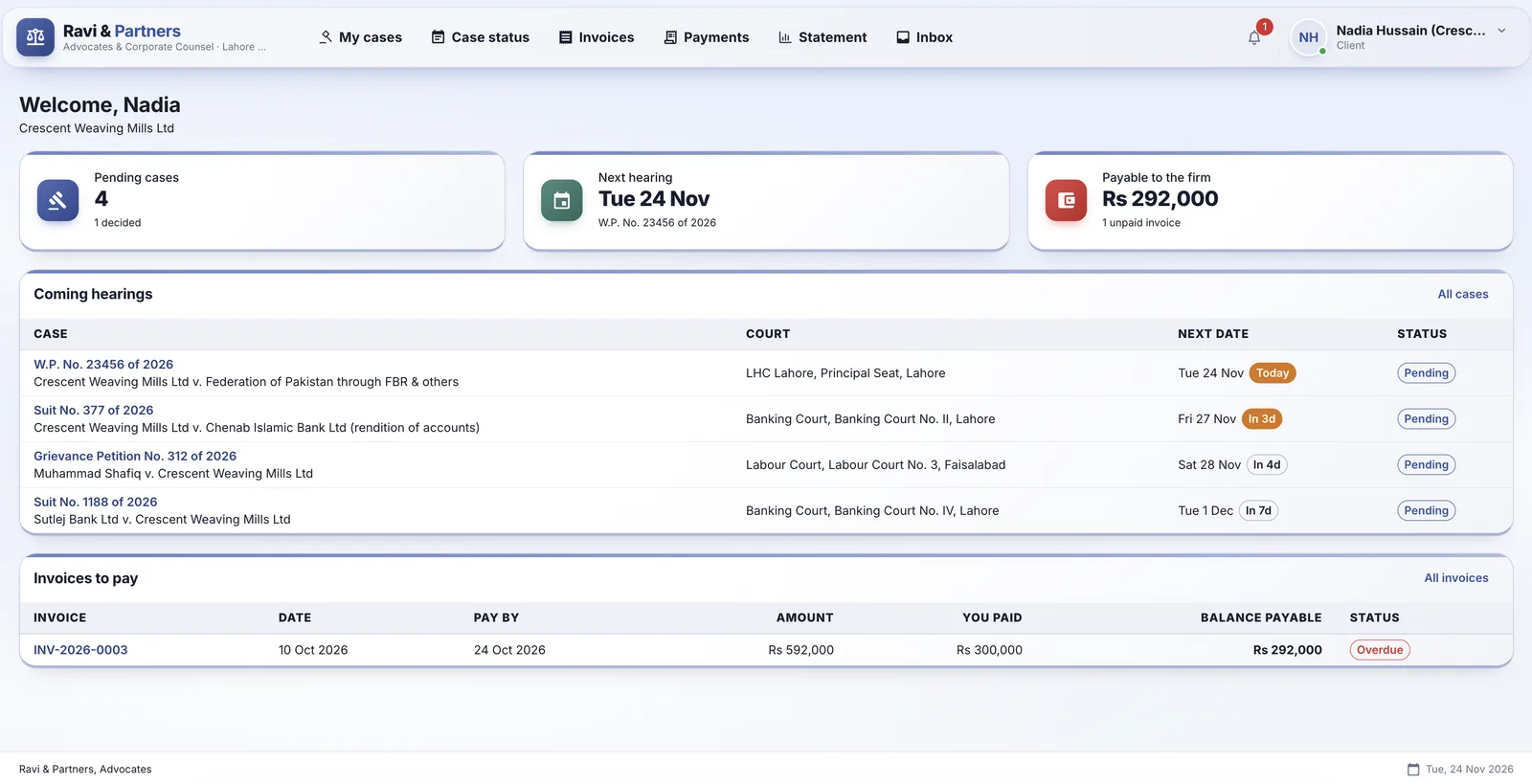
Their own app and web portal with cases, next dates, orders and invoices, so they stop calling the office.
The daily problems it takes away
Built with the clerk, the accountant and the senior partner in mind.
A working day at the firm, with the system
What actually changes for the partner, the clerk, accounts and the client.
- 18:00 am · The morning briefThe partner opens the dashboard: today's and tomorrow's hearings with who is going, overdue deadlines, stays about to lapse and approvals waiting.
- 29:30 am · The cause list, sortedThe clerk pastes the day's cause list. The firm's cases come up with court room and serial number, and anything uncertain is flagged.
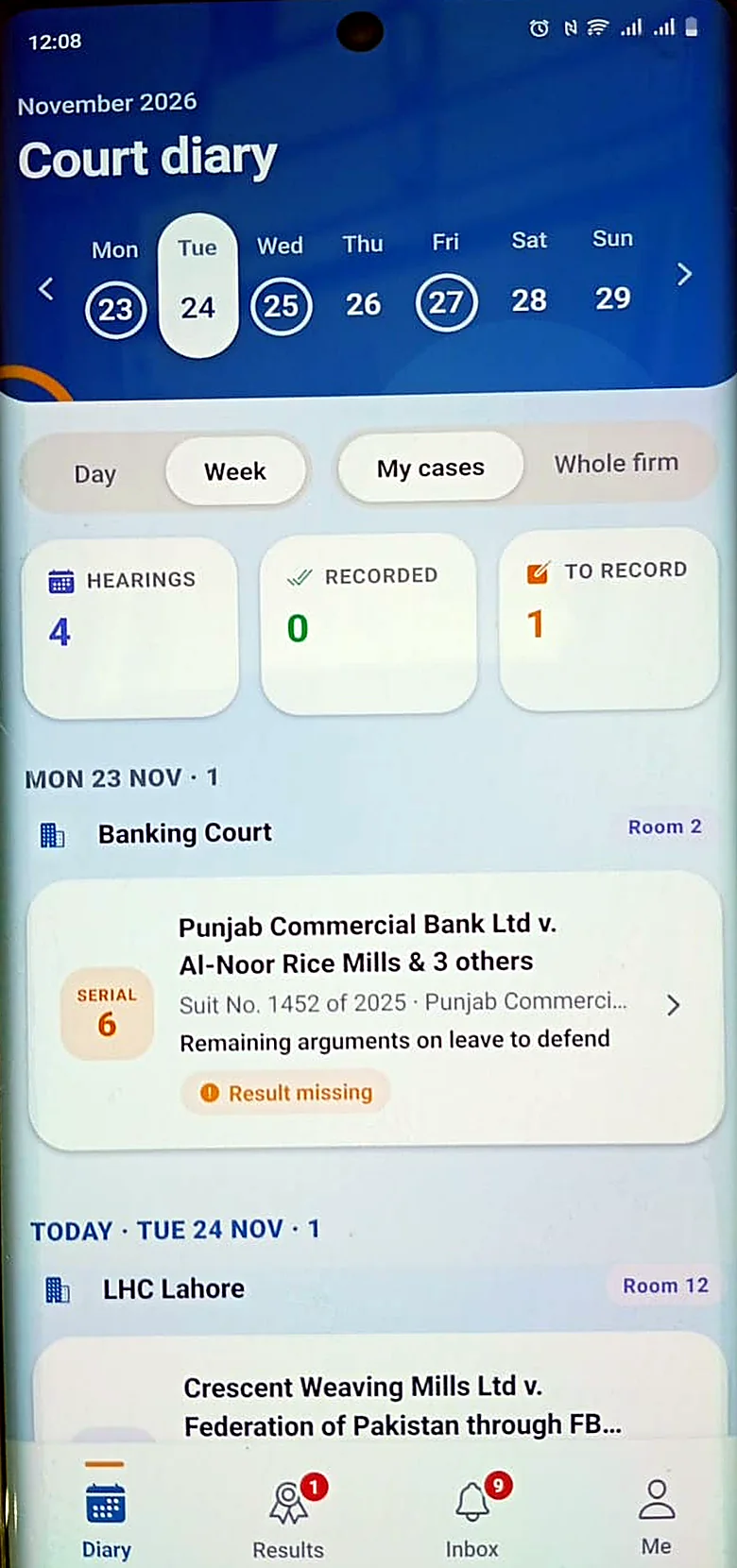
- 311:15 am · Outside the court roomThe hearing is recorded on the phone with one-tap phrases, the judge is picked and the next date goes into the diary.
- 411:16 am · The client already knows“Tell the client” sends the order in brief and the next date to the client's app. Nobody has to make the call.
- 53:00 pm · Money in, correctlyA bank pays an invoice less tax. Accounts enters what was received, the deduction is worked out, and the client ledger is up to date. A post-dated cheque is logged and comes up the week it falls due.
- 66:00 pm · Nothing slips overnightAny hearing still without a result is flagged to the people on that case, and the partner approves the day's expenses and settlements.
Court work, handled from the phone
Built around how courts in Pakistan actually work: cause lists, court rooms, serial numbers and next dates.
The court side of the firm runs from the same system, in the office and outside the court room.
Hearing results from the phone
Outside the court room, the clerk or junior taps what happened, picks the judge and enters the next date, with one-tap phrases.
The next date files itself
It goes straight into the court diary, the team is told, and the client hears the same day.
No hearing left unrecorded
When a date passes with nothing entered, the people on that case are reminded until it is.
Cause lists matched to your cases
Paste the day's cause list and the system finds your cases with court room and serial number, and flags any it's unsure of.
See 4 more
Court diary by room and serial
Today and the week ahead, laid out the way the clerk walks the corridors, with an “only mine” view for each lawyer.
Stays and interim orders watched
Orders about to lapse are flagged ahead of time, and an extension keeps the full history.
Limitation and deadlines
Common limitation periods are built in, so the due date is worked out for you.
Conflict check before taking a matter
One search across every client, director, contact and opposing party the firm has ever had.
AI assistants
Assistants that read the firm's records and write you a page
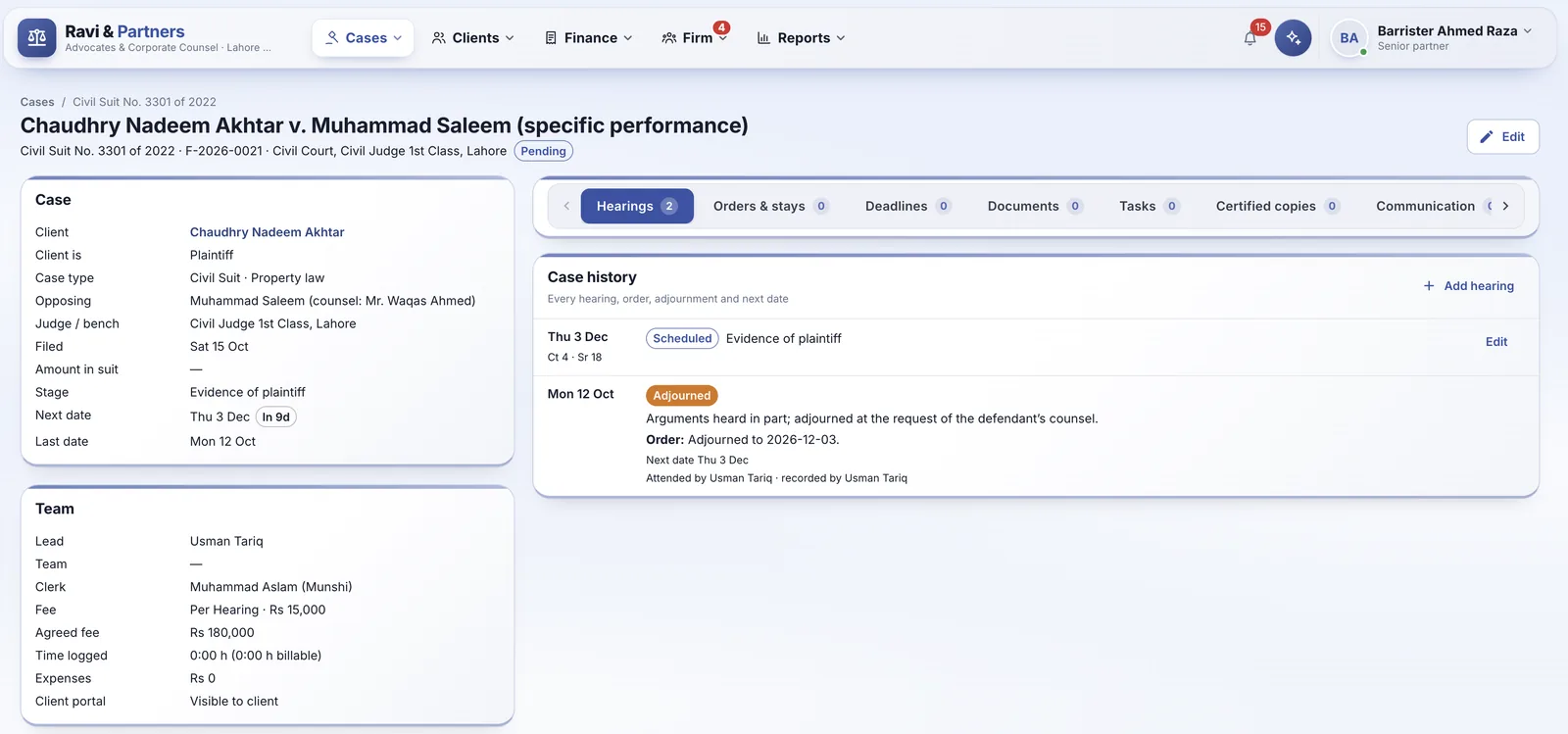
Five assistants sit on the partner's dashboard. Each one reads the firm's own cases, hearings, deadlines and accounts, and prepares a page you can read, print or send.
- Today at a glance. A morning brief: what's overdue, what's due this week, today's and tomorrow's hearings with who is going, and cases slipping without a next date.
- Before a hearing. A page on the case you're about to appear in, ready before you leave for court.
- Client status report. A client's full case list, ready to print or send.
- What is at stake. Amounts claimed against each client, bank by bank, and what is settling.
- The team's work. Overdue tasks, hearings with no one going, and who has too much on.
- Always current. Press “Bring up to date” and the page is rewritten from the latest records.
Fees and client money
Tax deducted at source, worked out for you
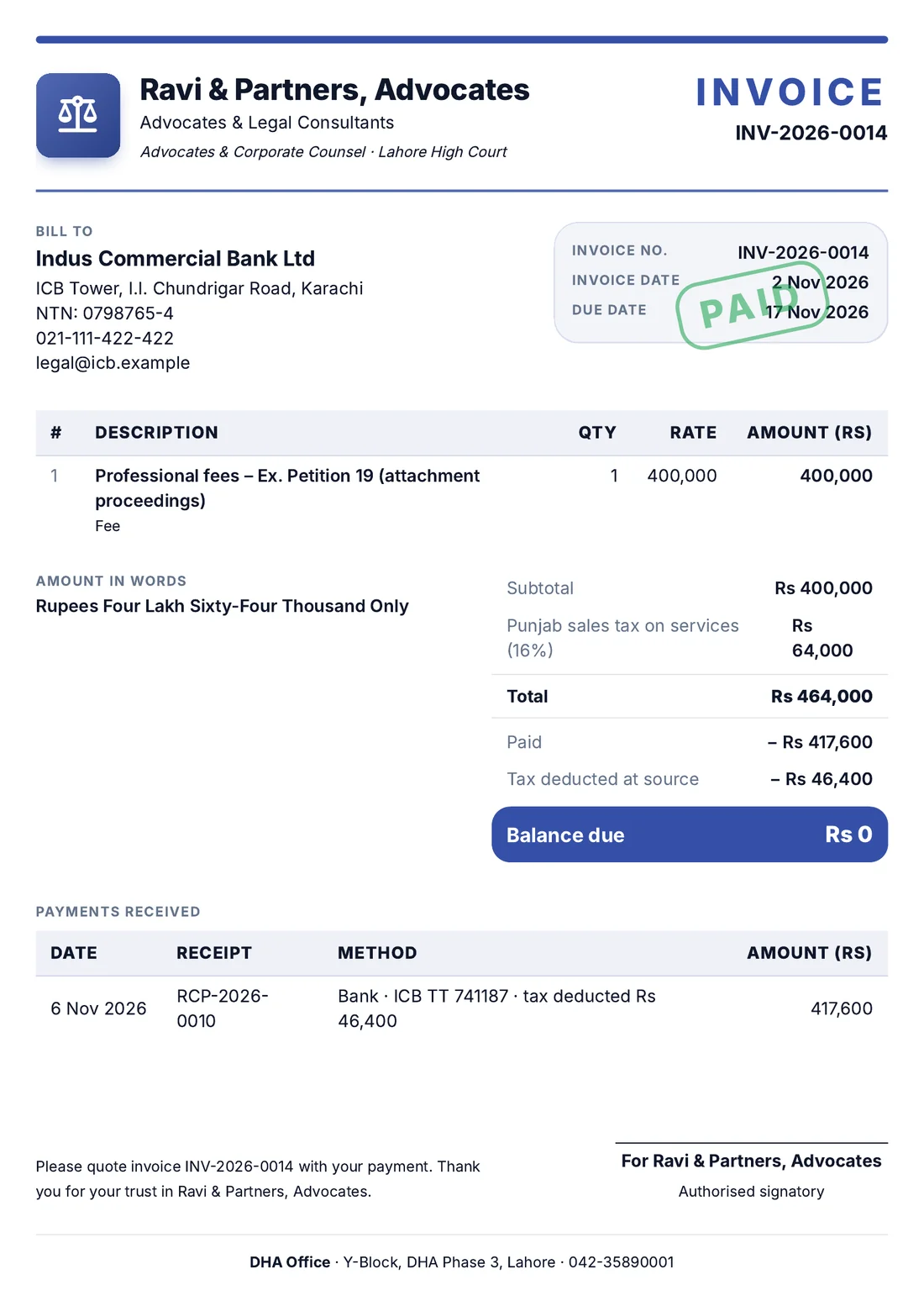
Staff enter only what was received. The deduction follows from the client's rate and counts as paid.
Expenses recovered first
Court fees, stamp papers and other out-of-pocket costs on an invoice are cleared before the fee, so nothing the firm paid is forgotten.
Retainers billed in one click
Every retainer client's monthly invoice raised together, with renewals flagged before they lapse.
Client advances held separately
Money a client leaves with the firm is tracked as theirs until spent on their case or applied to an invoice.
See 2 more
Every payment in the right account
Receipts and expenses post to the bank or cash account they used, and profit and loss updates by itself.
No double payments
Two people recording the same payment at the same moment cannot settle an invoice twice.
Cheques and cash
Every cheque and every rupee accounted for
The money side of a Pakistani law firm runs on cheques and cash. The system handles both properly, down to the last leaf and the last note in the cash box.
- Cheques printed on your own bank's leaf. Payee, amounts and the date in its eight boxes print exactly in place.
- Amount in words, never mistyped. “Rupees One Lakh Twenty-Five Thousand Only” is written by the system from the figure.
- Cheque books that count themselves. The next leaf comes up on its own, spoilt leaves are kept on record.
- Post-dated cheques under control. Warned the week they fall due. A payment counts only when the cheque clears.
- A bounced cheque undoes itself. Whatever it booked is reversed, so the accounts never show money that never arrived.
- Daily cash book and cash count. Numbered vouchers, opening and closing balance, and an end-of-day count that shows any difference at once.
Reports partners actually use
Partner's dashboard
Today's hearings, deadlines this fortnight, stays about to lapse, new cases and money owed, on one screen.
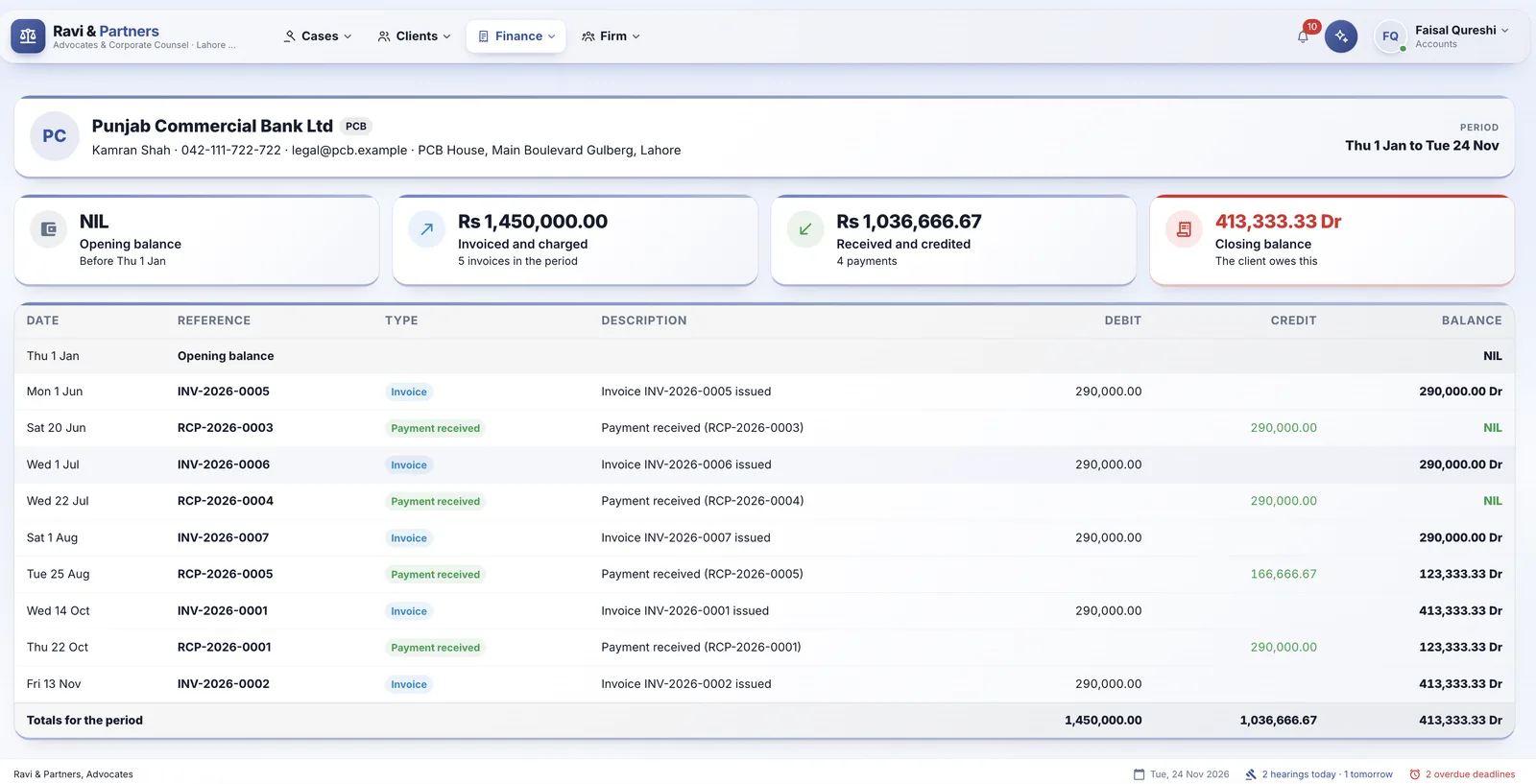
Client ledger
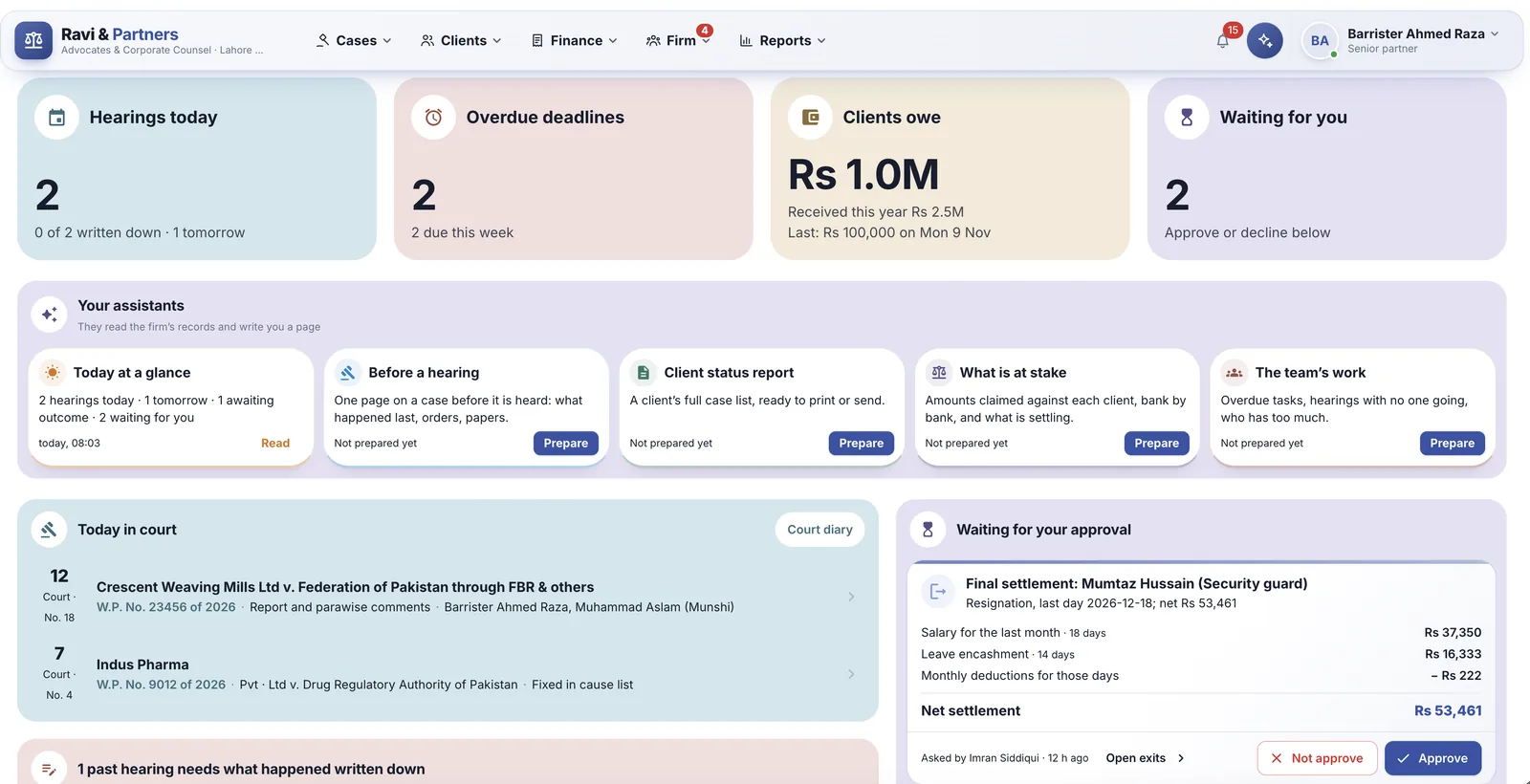
For any client or corporate group and any period: agreed fee, received, tax deducted and what's still payable, case by case.
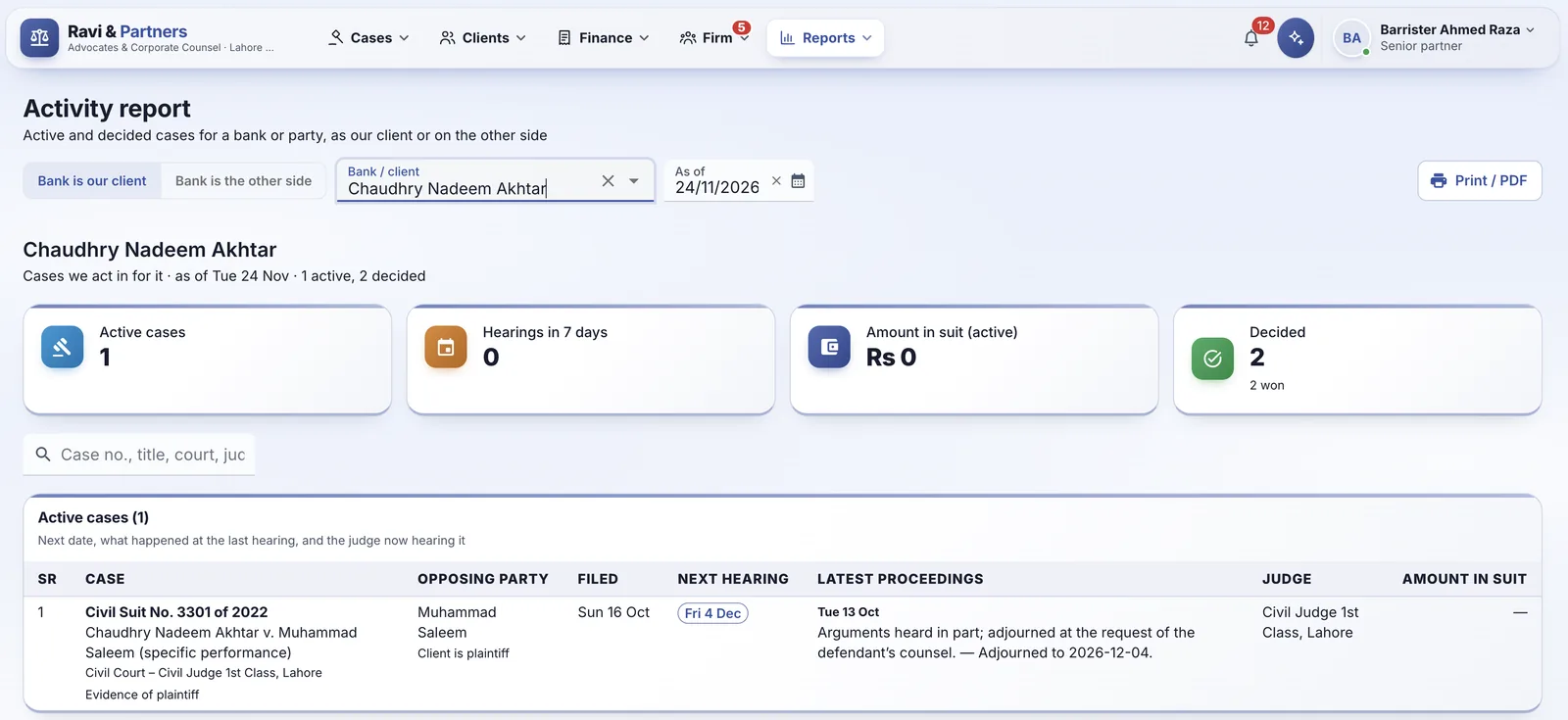
Activity report for a bank, both ways round
Pick a bank as your client or as the other side: every active case with next date, latest proceedings and judge, plus decided cases.
Case reports with charts
Cases by status and type, top clients and the amount in suit, at a glance.
See 2 more
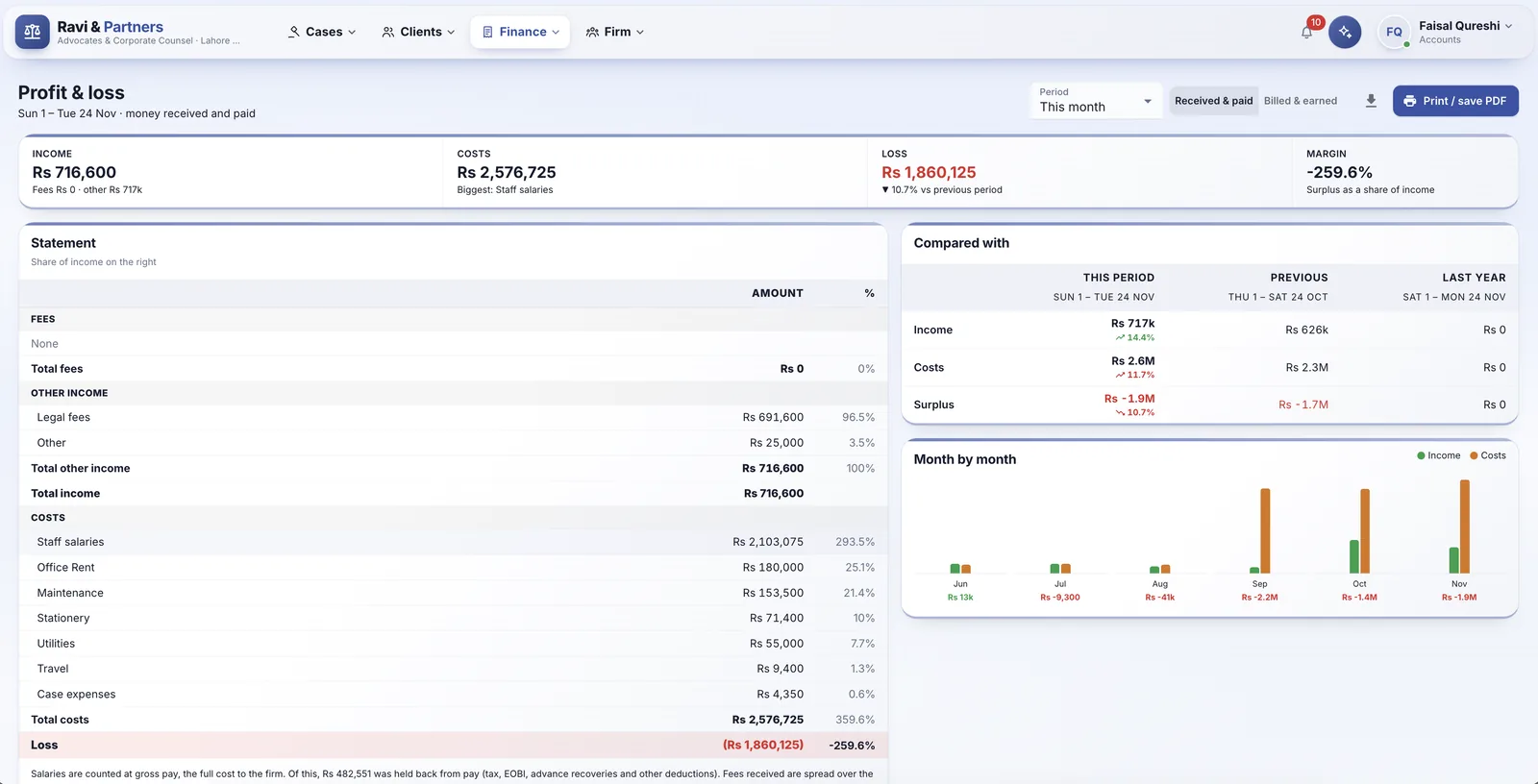
Profit and loss
By month and office, on cash received and paid or on fees billed and earned.
On your letterhead
Every report prints on the firm's letterhead or saves as a PDF.
A client portal that stops the phone calls
Clients sign in with their mobile number and see their own matters, without calling the office.
Cases and next dates
With the court's orders as each hearing is recorded.
Shared documents
Petitions, replies and judgments you choose to share.
Invoices and statement of account
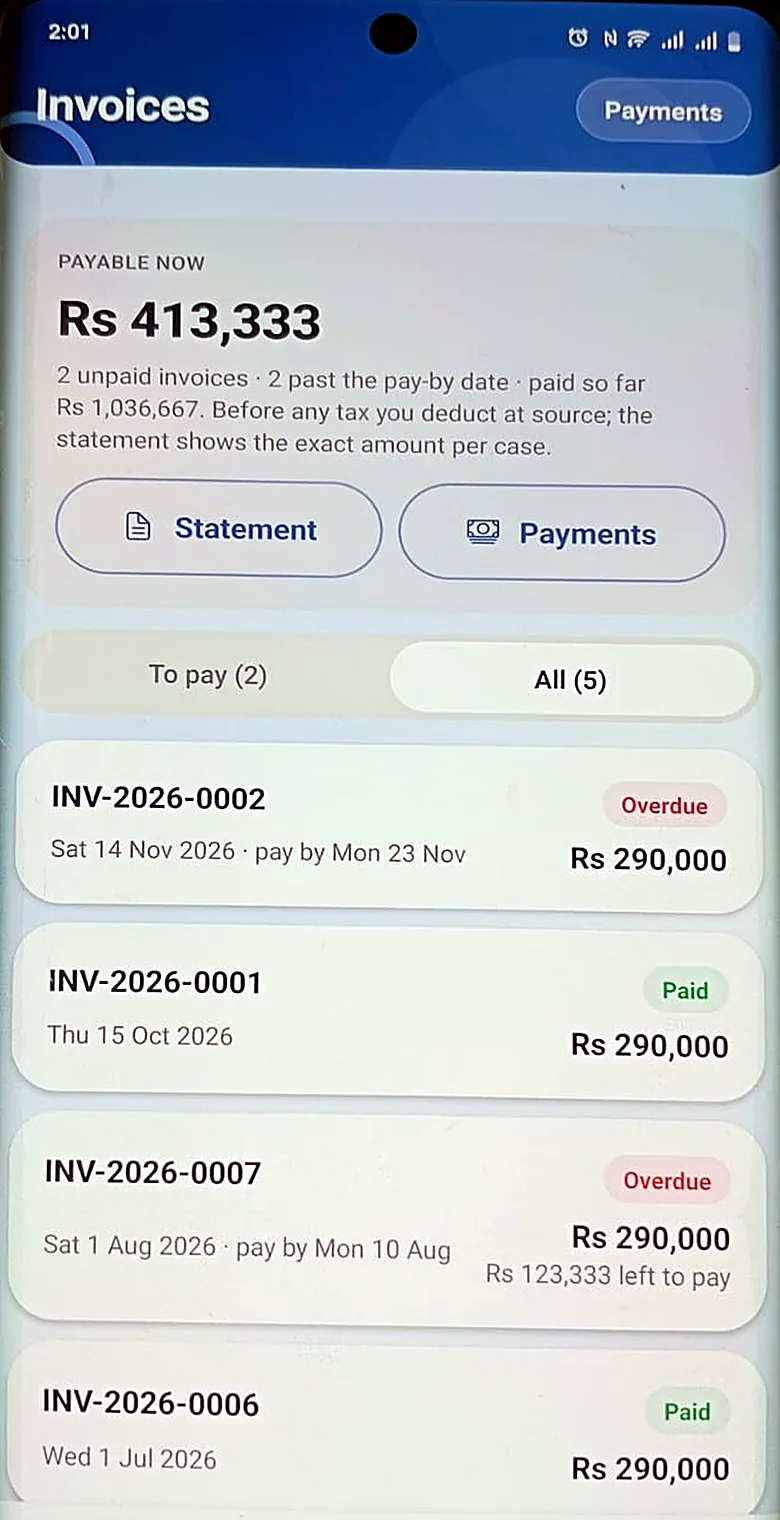
Including tax deducted and what's still due.
Printable case status report
For their own management or their bank's head office.
See 1 more
Your notes stay private
Internal proceedings, fee arrangements and lawyers' notes are never shown.
Documents and drafting
Drafts that fill themselves
Templates pick up the case number, court, parties and client details, so a standard application is ready in a moment.
Every version kept, and signed
Each draft of a petition or reply is kept, and a signed version carries a fingerprint that shows if it was ever altered.
Case files in one place
Sorted by kind, with a choice of what the client may see.
Certified copies tracked
From application to collection, so none is forgotten at the copying branch.
See 1 more
Your own judgment bank
Searchable by citation, court and topic.
Staff and payroll
Attendance in seconds
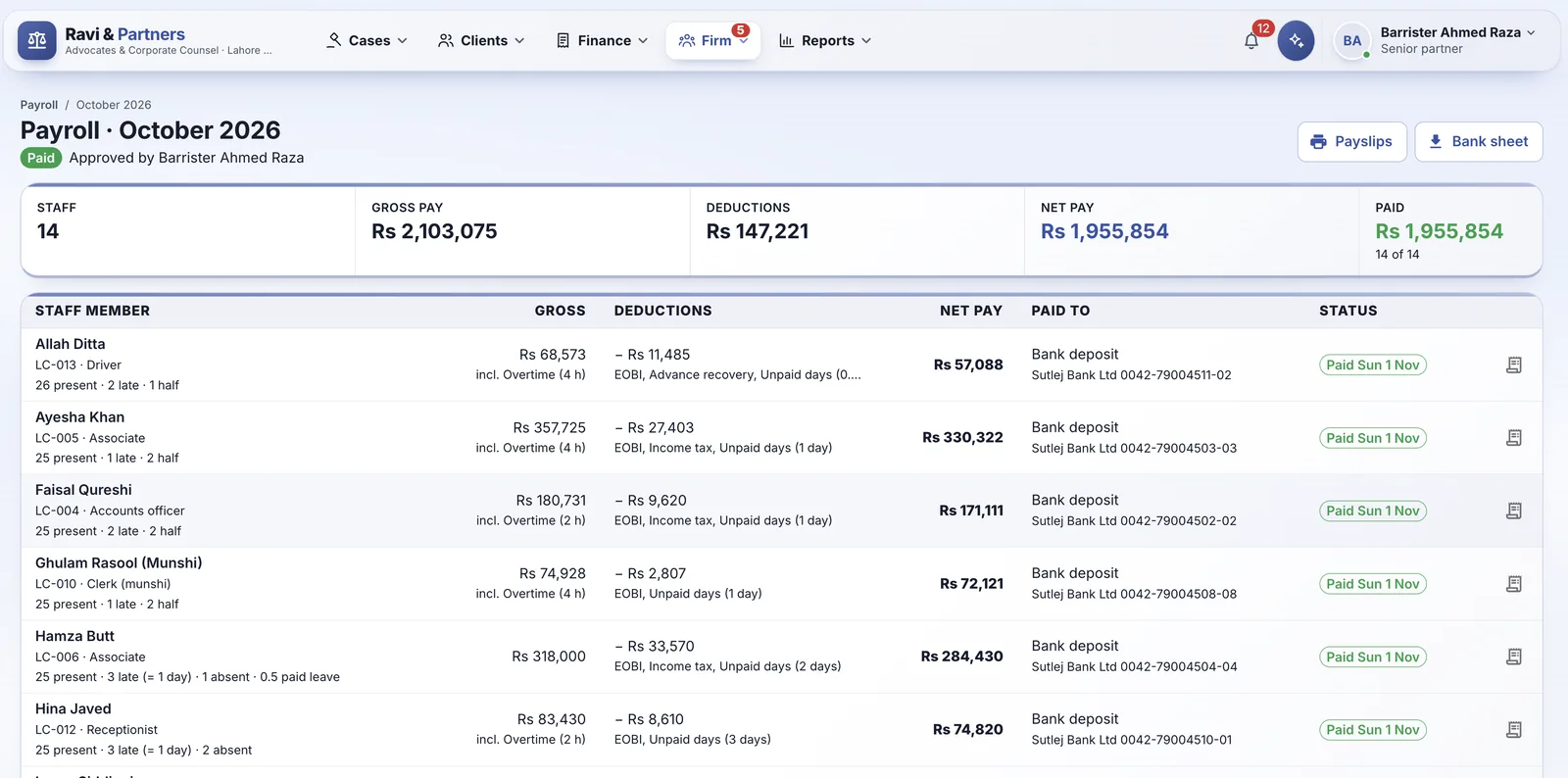
Mark everyone present with one tap. Anyone after the late time is marked late by themselves.
Payroll the partner approves
Accounts prepares the month, the senior partner approves, and it's paid from the firm's bank in one step.
Advances recovered automatically
A set amount from each payslip until cleared.
Payslips, leave and exits
Staff see their own payslips, leave balances are tracked, and final settlements go to the partner for approval.
Control and confidentiality
Mobile apps built for confidentiality
Screenshots and screen recording are blocked in the lawyer's and client's apps, so case details and orders can't be captured and forwarded. The apps follow the same role rules as the office, and an account that is disabled is signed out on the phone at once.
Each person sees only their part
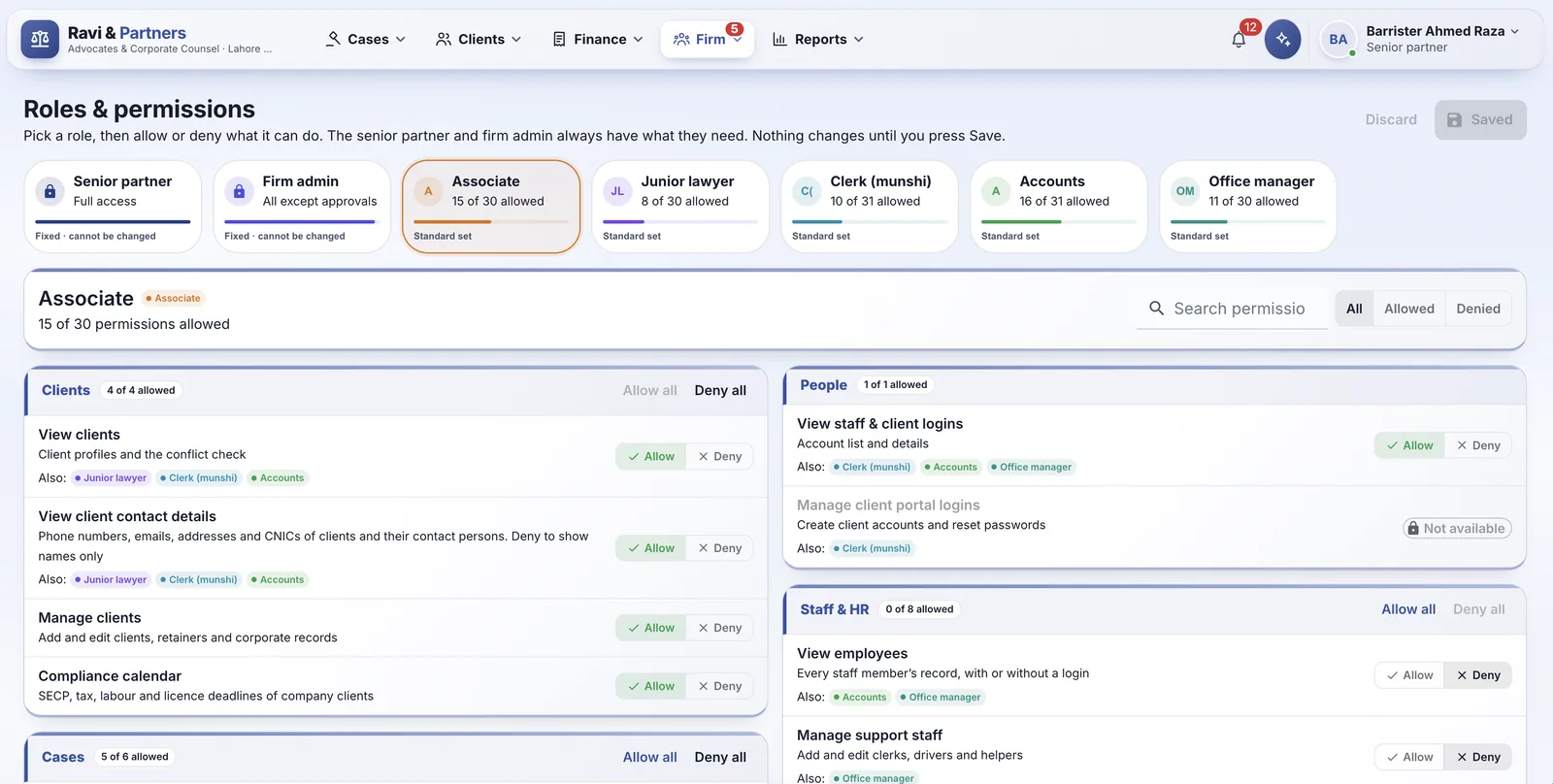
Juniors see their own cases; fees only partners, associates and accounts; client phone numbers and CNICs only those who need them.
You decide what each role may do
From the settings, without calling a developer.
Every change is on record
Who changed what and when, down to a fee, a payment or a viewed client file.
The firm's own lists
Case types, practice areas, courts, judges, opposing parties and proceeding phrases are yours to change.
See 1 more
Works anywhere
In the office on Chrome or Safari and on any phone at court, with dd/mm/yyyy dates and a dark mode for late evenings.
How we start
There's no price list to guess from. We agree what you need first, then I quote for exactly that. Most setups go live within one to two weeks, depending on how quickly we finalise the features.
- 1Free demoSee the system working, at your premises in Lahore or online from anywhere in the world.
- 2Your requirementsWe go through your process, documents and reports together.
- 3Agreed scope & quoteA written list of the features we agreed, and a clear quote for exactly that. No hidden extras.
- 4Setup & data importYour clients, cases, next dates and outstanding fees brought across from your registers or Excel, so you start with today's cause list, not an empty system.
- 5Training & go-liveI train your team before you switch over.
- 6Ongoing supportDirect WhatsApp support from the person who built it. I usually reply the same day.
Questions owners ask
Anything else, ask me directly. I usually reply the same day.
Can our clerk really update cases from the court?
Yes. It works on any phone. The clerk or junior taps what happened, picks the judge and enters the next date, with ready-made phrases such as “Arguments heard in part” filled in with one tap.
What if a hearing is never recorded?
When a date passes with nothing entered, the people on that case are reminded until it is. No hearing is left unrecorded.
Will clients see our internal notes or fee arrangements?
No. Clients see their cases, next dates, court orders, documents you choose to share, invoices and their statement. Internal proceedings, fee arrangements and lawyers' notes are never shown.
Does it handle tax deducted at source by corporate clients?
Yes. Staff enter only what was received, and the deduction follows from the client's rate and counts as paid. The client ledger shows agreed fee, received, tax deducted and what's still payable.
Can it print cheques on our bank's cheque leaves?
Yes. Each bank's layout is set once. Payee, amount in figures and words, and the date in its eight boxes then print exactly in place, and the cheque book tracks every leaf.
Who in the firm can see what?
You decide, from the settings, without calling a developer. By default juniors see their own cases, fees are visible only to partners, associates and accounts, and client phone numbers and CNICs only to those who need them. Every change and every viewed client file is on record.
Are the mobile apps secure?
Yes. Screenshots and screen recording are blocked in the lawyer's and client's apps, so case details and orders can't be captured and forwarded. The apps follow the same role rules as the office, an account that is disabled is signed out at once, and every viewed client file is on record.
Can we bring our existing case records across?
Yes. During setup your clients, cases, next dates and outstanding fees are brought across from your registers or Excel sheets, so the firm starts with its current cause list rather than an empty system.
Which courts does it work with?
Any court or tribunal in Pakistan: High Courts, civil and sessions courts, banking courts, labour courts and special tribunals. Courts, judges, court rooms and case types are the firm's own lists, so you can add any forum you appear in.
Does it work on phones, and on Android and iPhone?
Yes. Lawyers, clerks and clients use it on their phones, and the office uses it in Chrome or Safari on any computer. It is built for use outside the court room, not only at a desk.
How long does it take to go live?
Most firms are live within one to two weeks, depending on how quickly the features are finalised. Your team is trained before you switch over, and support comes directly from me on WhatsApp.
Is our data safe, and can we take it with us?
Your data is backed up every day, hosted on secure cloud servers with encrypted connections, and visible to each person only as far as their role allows. You can export your records whenever you ask, including if you ever decide to move on.
How much does it cost?
There's no fixed price list, because every organisation needs something slightly different. We start with a free demo, then go through your requirements together and agree exactly which features you need. After that you get a clear written quote for that scope, with no hidden extras.
Guides for law firms
Practical write-ups on the problems this system was built to solve.
Other products
Built on the same foundation: proper accounting, role-based security, a full audit trail and AI that asks before it acts.
See it working on your own data
I'll walk your partners and clerk through recording a hearing, the court diary, a client ledger with tax deducted and cheque printing. Demos run at your chambers in Lahore or online.
- WhatsApp+92 345 458 0083
- Book a call30-min video call (Calendly)
- Email[email protected]
- LinkedInlinkedin.com/in/zia-urrehman
- LocationLahore, Pakistan · on-site visits and online demos worldwide