
School management software for Pakistan
Your school, running from one platform and one branded app
A web portal for the office and leadership, plus mobile apps for parents, students, teachers and the director. All connected.
A teacher marks the register and the parent's phone buzzes within seconds. A parent pays the fee from their bank app and the voucher shows as paid without anyone typing it in. That's the everyday experience this platform gives your school.
- Your own appschool name, logo and colours on Android & iPhone
- 1Bill & Kuickpayfees paid from any bank app, marked paid automatically
- Web portal + 4 appsfor parents, students, teachers and the director
What it is, in plain words
School management software built around how schools in Pakistan actually run.
The School Management Platform is one system for a school's office, teachers, parents and director. Teachers take the register and parents are alerted within seconds. Fees are paid from any bank app through 1Bill or Kuickpay and the voucher marks itself paid. Homework, results, PTM bookings, staff attendance and payroll all run from the same place, with your school's own app on Android and iPhone.
Private schools
One campus, an office that wants fewer calls and registers, and parents who expect updates on their phone.
School systems with several campuses
Each campus runs its own day, while the director sees attendance, collections and approvals across all of them.
Colleges and academies
Timetables, tests, results and fee collection, with students signing in to their own timetable, diary and results.
Owners and directors
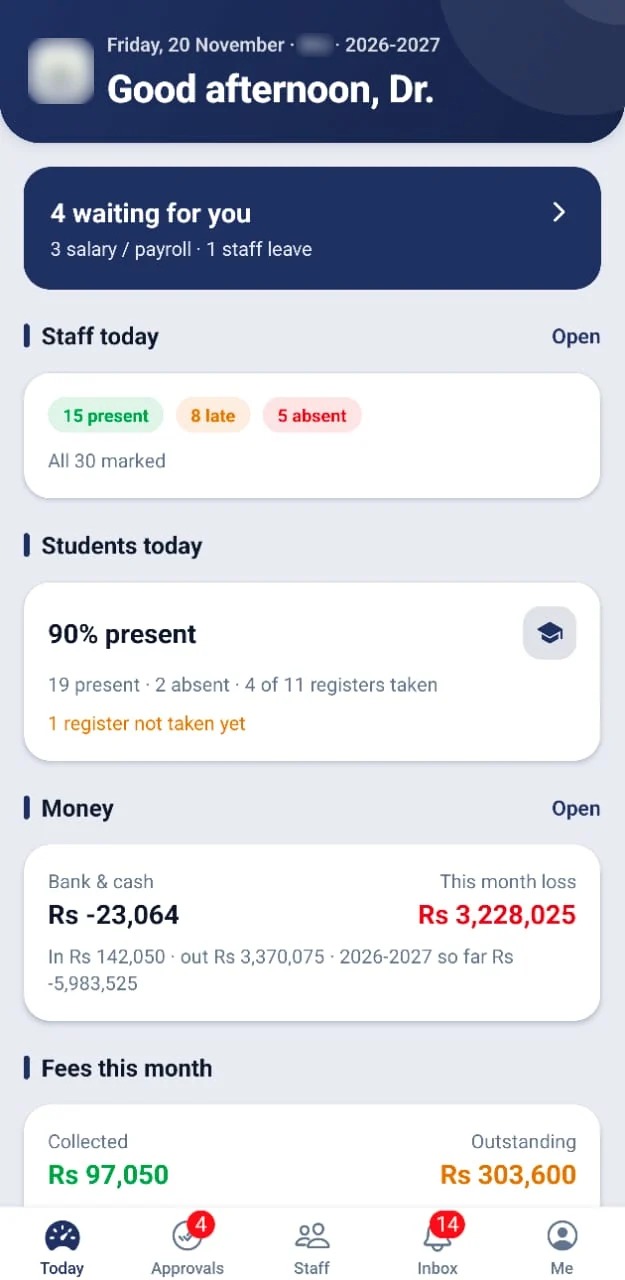
Attendance, collections, approvals and profit and loss on the phone, plus an AI assistant that answers from the school's own records.
The daily problems it takes away
Every feature exists because a school office was doing this by hand.
A school day, with the platform
What changes for teachers, the office, parents and the director.
- 17:50 am · The register, in secondsEveryone starts as present, so the teacher only taps the exceptions. Parents of absent and late children get an alert straight away.
- 2After the lesson · No register forgottenTeachers who haven't taken their register are reminded automatically, and approved leave is already marked.
- 311:00 am · Homework reaches homeTeachers set homework with worksheets from their phone. Parents are notified, and nothing is lost in a school bag.
- 42:00 pm · A fee paid from a bank appA parent pays through 1Bill or Kuickpay. The voucher is marked paid, the receipt is issued and the parent is notified, with nobody typing it in.
- 5Results day · One clickMarks are entered by each teacher, grades and class positions are worked out, and every parent is told when results are published.
- 6Evening · The director, at a glanceAttendance, collections, approvals and defaulters on the director's phone, wherever they are.
Parents see their child's whole school day
Your school's own branded app on Android and iPhone, with real push notifications that open the right screen.
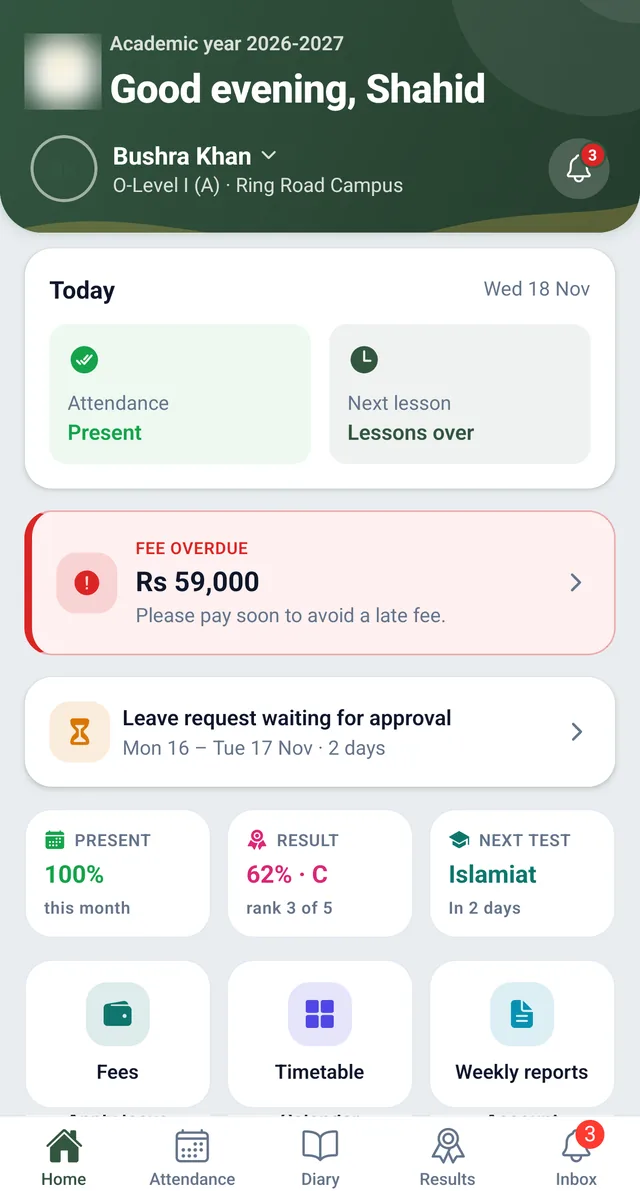
The parent's home screen answers “how is my child doing today?” at a glance, in the app and on the web.
Today, at a glance
Whether the child was marked present, the lesson happening now, homework due and the next test.
Alerts that matter
Low attendance, fees due or overdue, and leave approved or waiting.
Diary & test calendar
Homework by day with worksheets (PDFs and images), and a test calendar with the syllabus.
Results & progress
Percentage, grade and class position for every exam, a progress chart across exams and the full result card.
See 4 more
Weekly reports
What was covered in each subject, the teacher's class remark and a personal note about this child.
Leave from the phone
Apply for leave with a medical note attached and see the teacher's decision.
Several children, one login
A quick switch between children, with unread counts for each one.
Student sign-in
Students get their own access to their timetable, diary, tests and results.
Attendance in seconds, with instant alerts
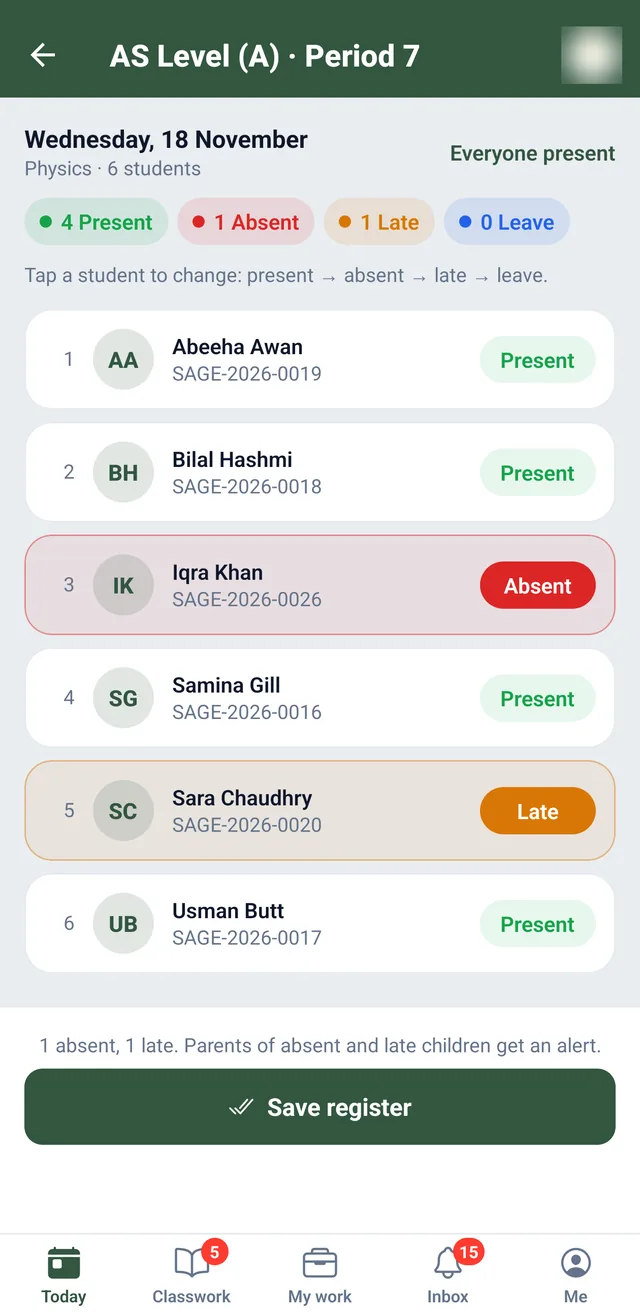
Teachers take the register on one screen, and parents of absent children are told straight away.
One-screen register
Everyone starts as present, so the teacher only taps the exceptions, from a phone or the web.
Daily or lesson-by-lesson
Each class can take one register a day or one per lesson. Subject-wise attendance shows the lessons a child needs to make up.
Instant parent alerts
Parents of absent and late children are notified within seconds.
Teachers are reminded
Automatic reminders go to teachers who haven't taken their register shortly after the lesson ends.
See 2 more
Early warnings
Flags any child falling below the school's required attendance percentage.
Leave and holidays built in
Approved leave appears on the register by itself, and calendar holidays are skipped automatically.
Teaching, exams and results
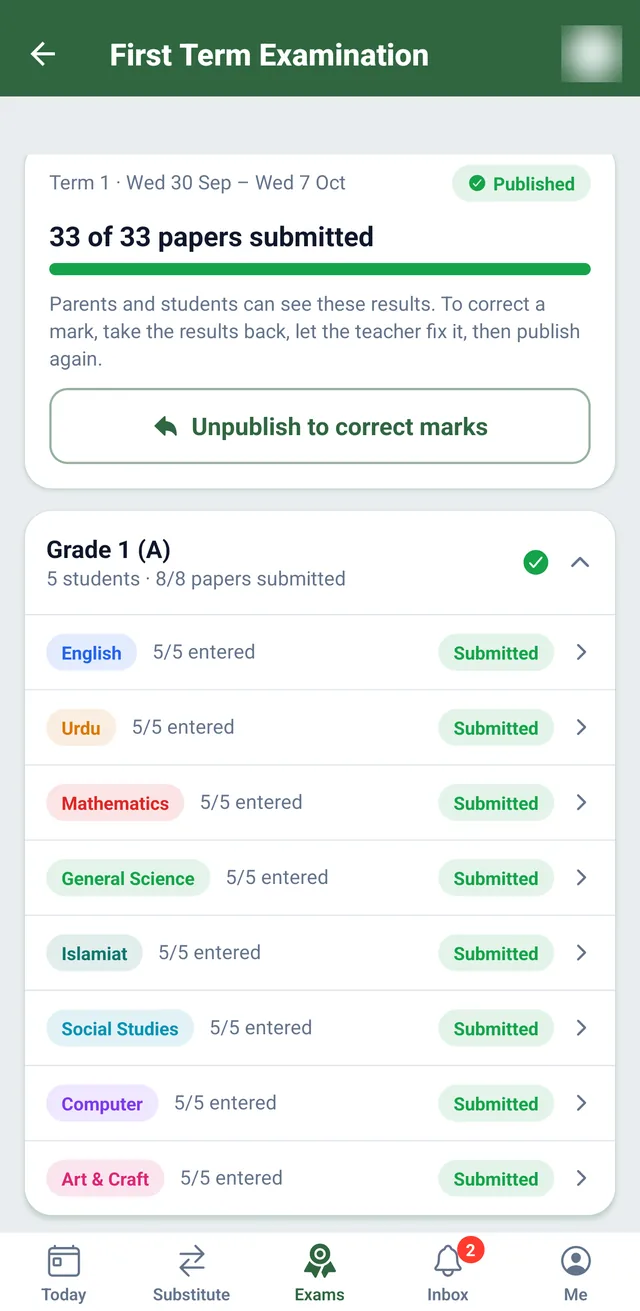
Classwork, tests and exams flow from the teacher to the parent with no paper in between.
Digital diary
Teachers set homework with worksheets from their phone, and parents are notified.
Test calendar with syllabus
Parents know what to revise, and when.
Exams end to end
Papers, marks entry by each teacher with progress tracking, and a preview before publishing.
One-click result publishing
Results lock when published, grades and class positions are worked out automatically, and every parent is told.
See 2 more
Progress over time
Trend charts across exams, overall and per subject.
Timetables
For every class and teacher, with the current lesson highlighted in the apps.
Fees collected faster, with online payment
Parents pay from any bank app, and the voucher is marked paid automatically.
1Bill & Kuickpay built in
Every voucher carries a consumer number payable through a bank app, ATM, JazzCash or Easypaisa. Payment is recorded, receipted and the parent notified automatically.
Monthly vouchers in bulk
For a whole class or campus, plus one-off charges such as trips, books and uniform.
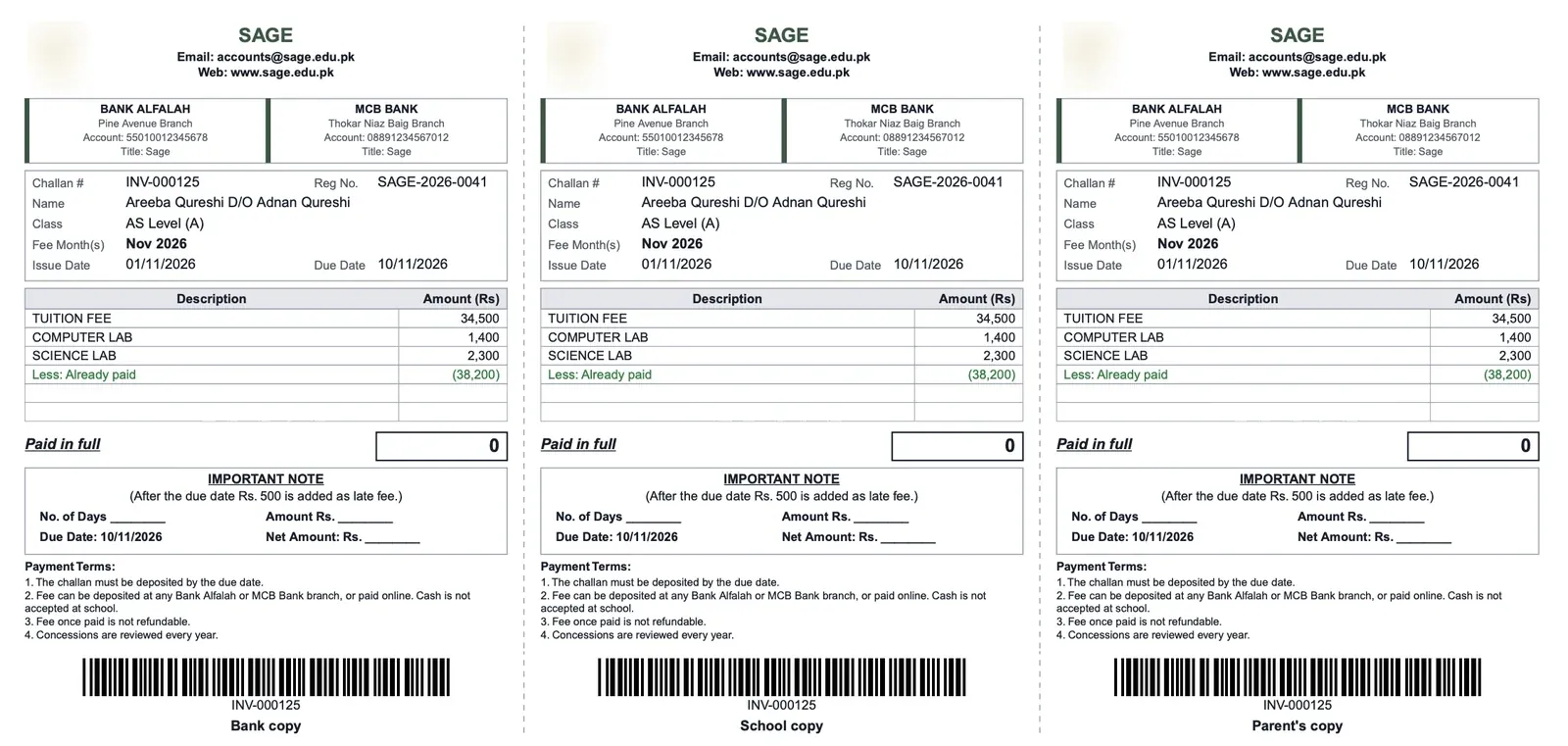
Your voucher design
School logo and colours, copies side by side on one A4 page. Print a whole class at once, or send on WhatsApp.
Late fees, automatically
Added after the grace days, with no manual work.
See 3 more
Concessions & discounts
Per student, by percentage or fixed amount, with an end date.
Defaulters list
Balances, days overdue and parent phone numbers, with one-click reminders.
Clean receipts
Payments settle the oldest dues first, and a cancelled receipt puts the dues back.
Signature feature
Parent-teacher meetings without the crowd
PTM day runs like a well-managed clinic: booked slots, live queues and a phone alert when it's the parent's turn. When a meeting runs over, the day absorbs it instead of piling up.
- Online booking. Parents pick the teachers they want. The app suggests back-to-back slots, including for siblings, with time to walk between rooms.
- Live queues. “You're next” and “it's your turn” alerts. Teachers call the next parent with one tap, and no two parents are ever sent into the same room.
- Waiting times that update live. “About 10:40. Please wait near Room 12”, moving later automatically if the teacher is running behind.
- Child at a glance for the teacher. Attendance, latest results and the topics the parent wants to discuss.
- Coordinator's live board. Any teacher running 10+ minutes late is flagged. Late parents join a walk-in queue, so on-time parents keep their turn.
- AI summary for management. Common concerns by subject and class, without children's names, plus notes, ratings and follow-up for parents who missed.
Staff, HR and payroll
The whole staff cycle is covered: arrival, leave, cover, salary and exit.
Staff attendance & rosters
Shifts and duty rosters. Anyone arriving after the late time is marked late automatically.
Staff leave
Yearly balances per leave type, applied for and approved from the phone.
Substitute planning
Mark a teacher away and the system suggests a free teacher for every lesson. It never double-books and spreads extra lessons fairly.
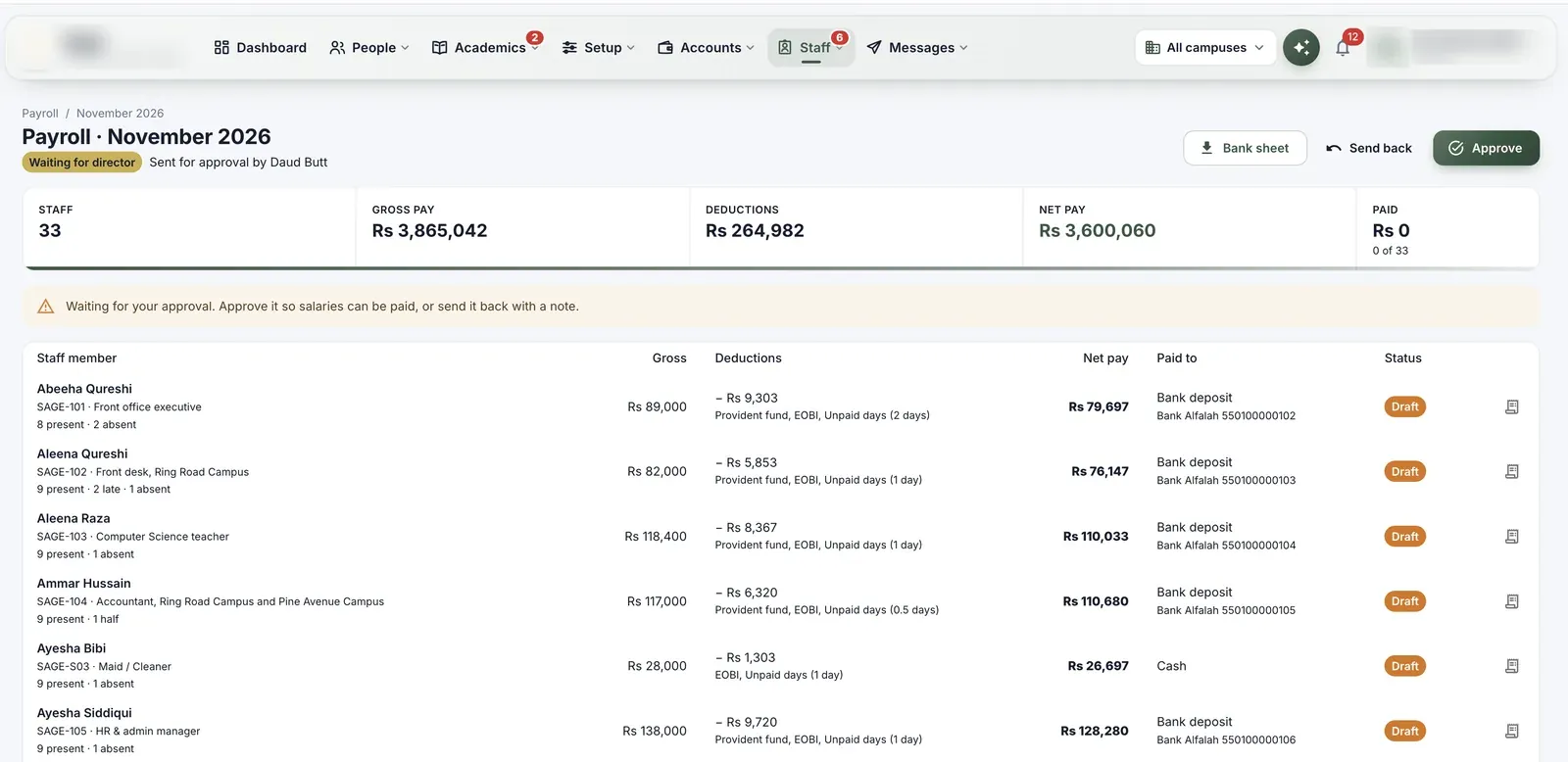
Payroll in clicks
Payslips drafted for all staff, approved by the director. Approval locks the month and recovers advance instalments.
See 3 more
Confidential staff records
Appraisals, commendations, warnings and complaints, with the employee's acknowledgement.
Exits & final settlements
Including gratuity and notice pay, approved by the director.
Staff self-service
Staff see their own attendance, leave balance, shifts and payslips in the app.
The director's school in their pocket, plus an AI assistant
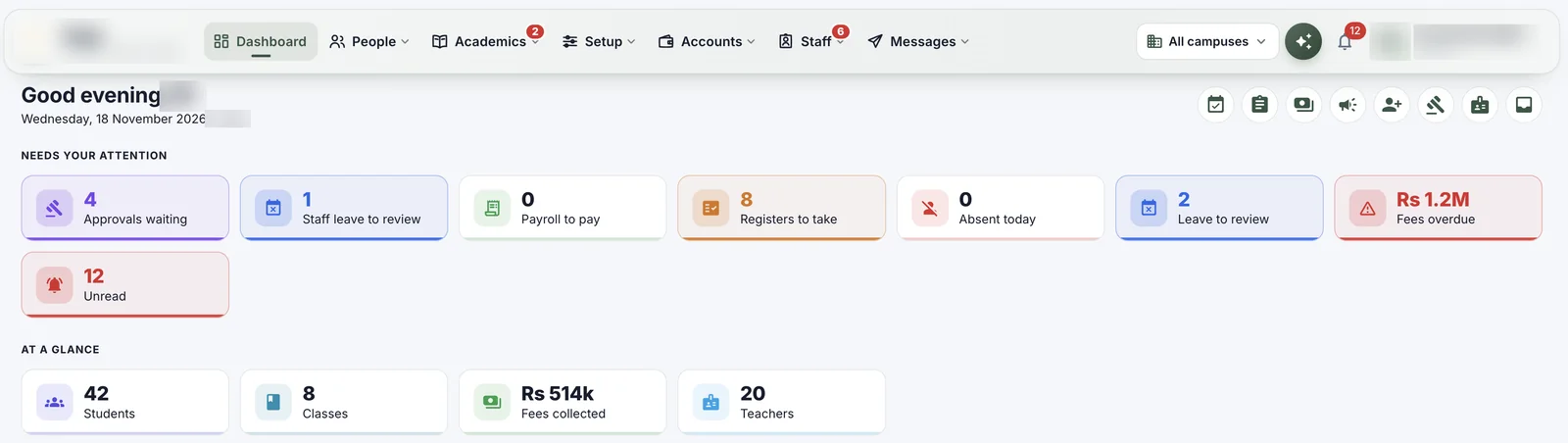
The director sees the whole school on their phone and makes decisions from anywhere.
Today at a glance
Students present, registers not yet taken, staff in today, and approvals waiting.
Money on the phone
Bank balances, collections and profit and loss for this month and the year so far.
Approvals from anywhere
Salary changes, monthly payroll and final settlements. Anything waiting more than two days triggers a reminder.
One true financial picture
Fees, salaries and expenses in one profit and loss report by campus and month, with nothing typed twice.
See 2 more
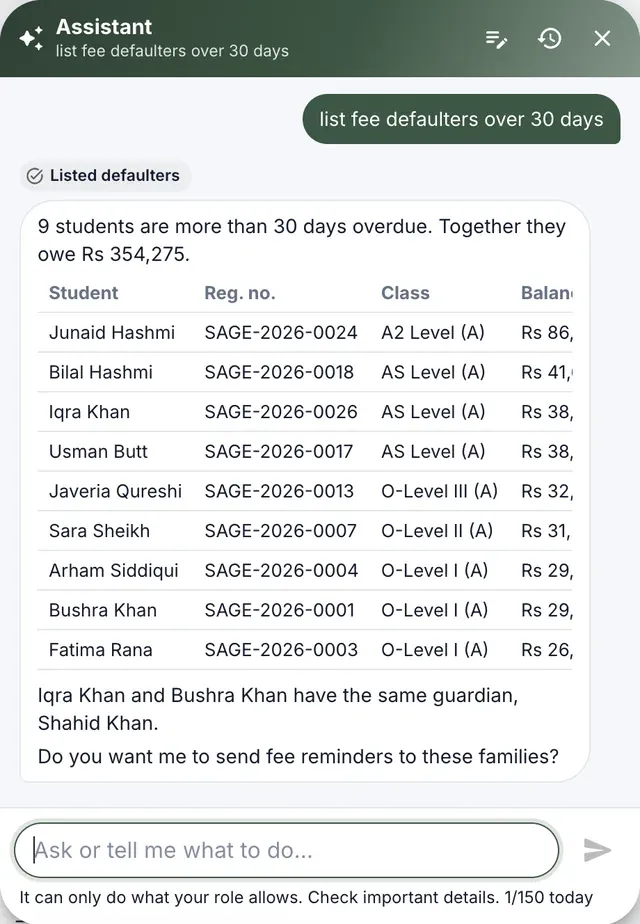
Ask in plain words
“Who is absent in Grade 5 today?”, “List fee defaulters over 30 days”, “What was our profit last month?”
Hands-on but safe
The assistant can take a register, set homework, send a notice, record a fee or add an expense. It always asks for confirmation first, works within the person's permissions, and every action is logged.
Communication that actually reaches parents
Every message lands in the app's inbox and as a push notification, so nothing depends on a child remembering a note.
Targeted notices
To one student, a class, a campus, the whole school, or staff by role.
Automatic alerts
Absence, homework, tests, results, fees, payments and leave decisions.
WhatsApp ready
Vouchers, reminders and messages sent to parents on WhatsApp in one click.
School calendar
Holidays, events, exam weeks and meetings, with featured announcements on every home screen.
Control, security and multiple campuses
Each person sees exactly what their role allows, and every change is recorded.
Multi-campus
Run several branches as one school. Staff can be limited to their own campus.
Roles that fit a school
Director, admin, HR, accounts, front office, coordinator and teacher. Teachers see only their classes, parents only their children.
Full audit trail
Every sign-in and every change, with before and after values and the time it happened.
Bank-grade sign-in security
Encrypted passwords, lockout after repeated wrong attempts, instant sign-out when an account is disabled, and “log out from all phones”.
See 1 more
Your data is yours alone
Each school's records are kept separate, with automatic checks that stop one school's data appearing in another.
How we start
There's no price list to guess from. We agree what you need first, then I quote for exactly that. Most setups go live within one to two weeks, depending on how quickly we finalise the features.
- 1Free demoSee the system working, at your premises in Lahore or online from anywhere in the world.
- 2Your requirementsWe go through your process, documents and reports together.
- 3Agreed scope & quoteA written list of the features we agreed, and a clear quote for exactly that. No hidden extras.
- 4Setup & data importYour students, parents, classes, fee structures and outstanding dues brought across from Excel or your current system.
- 5Training & go-liveI train your team before you switch over.
- 6Ongoing supportDirect WhatsApp support from the person who built it. I usually reply the same day.
Questions owners ask
Anything else, ask me directly. I usually reply the same day.
Will the app really carry our school's name and logo?
Yes. Parents download an app with your school's name, icon, colours, logo and motto, in light and dark mode. The web portal and printed fee vouchers carry the same branding.
Do parents need to be tech-savvy?
No. Parents sign in with their mobile number, and one login covers all their children. Every notice arrives as a push notification, and staff can still check in parents who don't use the app on PTM day.
How do online fee payments work?
Each voucher carries a 1Bill / Kuickpay consumer number. Parents pay from their bank app, an ATM, JazzCash or Easypaisa, and the voucher is marked paid and receipted automatically. No one types it in.
We have several campuses. Can it handle that?
Yes. Several branches run as one school, staff can be limited to their own campus, and reports can be split by campus and month.
Is our students' data safe?
Each school's records are kept separate, with automatic checks that stop one school's data appearing in another. Every role sees only what it should, every change is logged with before-and-after values, and accounts lock out after repeated wrong passwords.
Can it be adjusted to how our school works?
Yes. That is the point of working with me directly rather than buying an off-the-shelf package. Register style, fee heads, leave types, grading and roles are set up around your school, and I can build what's specific to you.
Can we bring our existing student records across?
Yes. During setup your students, parents, classes, fee structures and outstanding dues are brought across from Excel or your current system, so the school starts with its real data rather than an empty system.
Does the parent app work on Android and iPhone?
Yes. Your school's own branded app, with your name, logo and colours, runs on both Android and iPhone, with real push notifications that open the right screen.
Can teachers use it from their phone?
Yes. Teachers take the register, set homework with worksheets and enter marks from a phone or the web, so they don't need to sit at the office computer.
How long does it take to go live?
Most schools are live within one to two weeks, depending on how quickly the features are finalised. Staff are trained before you switch over, and support comes directly from me on WhatsApp.
How much does it cost?
There's no fixed price list, because every organisation needs something slightly different. We start with a free demo, then go through your requirements together and agree exactly which features you need. After that you get a clear written quote for that scope, with no hidden extras.
Guides for schools
Practical write-ups on the problems this platform was built to solve.
Other products
Built on the same foundation: proper accounting, role-based security, a full audit trail and AI that asks before it acts.
Free brochure
Request the School Management brochure
A 2-page overview of the platform, the apps for each person in your school, and how we get you started. I send it personally on WhatsApp or by email.
See it working on your own data
I'll show you the parent app, the fee flow and PTM day using your own classes and fee structure, so your team can judge it on real work. Demos run in person in Lahore or online.
- WhatsApp+92 345 458 0083
- Book a call30-min video call (Calendly)
- Email[email protected]
- LinkedInlinkedin.com/in/zia-urrehman
- LocationLahore, Pakistan · on-site visits and online demos worldwide